From Written Text to Your First Video: What Changes When the Message Has to Sound Natural?
How to turn written text into natural speech on camera: writing for the ear‚ breathing‚ eye contact with the lens‚ body language‚ tone‚ light and sound.
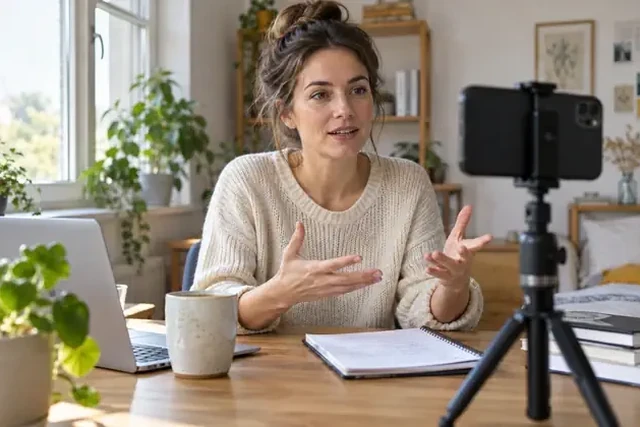
Writing allows long sentences‚ complex words and a neat structure‚ while speaking to a lens demands rhythm‚ breath and simplicity. That is why many people who start appearing in videos choose a practical and focused on-camera acting course that teaches how to turn written text into living speech. In this kind of practice you learn to work with your voice‚ your facial expressions and your gaze into the lens‚ and also to let go of the fear of mistakes. These tools are relevant to lecturers‚ consultants‚ business owners and anyone who needs to get a message across on video. Even without formal training‚ there are a few principles worth knowing before your first recording. They touch on the writing‚ the speaking‚ the body and the way you prepare for the recording.
Writing for the Ear
Text written to be read by the eye is built differently from text meant to be heard. A reader can go back‚ pause and reread a complicated sentence‚ while a viewer hears each word only once. So write the script in spoken language‚ with simple words‚ direct sentences and concrete examples. A simple test is to read the text aloud before recording and mark every place where your tongue trips or the sentence sounds like an official document. Rephrase those sentences as if you were telling the story to a friend sitting across from you.
Short Sentences and Breathing
One of the most common difficulties in a first recording is running out of air in the middle of a sentence. Long sentences make the speaker speed up‚ swallow words and end the sentence in a weak voice. Dividing the text into short units‚ with a natural place to breathe between them‚ immediately improves clarity and confidence. Mark the breathing points in the script‚ much like musical notation. Calm breathing from the belly slows the pace‚ lowers tension and lets the voice sound full and steady.
Eye Contact with the Lens
In a face-to-face meeting‚ eye contact builds trust and a sense of closeness. On camera‚ the lens is the viewer's eyes‚ and a gaze that wanders away from it is read as insecurity or evasiveness. Many people find it hard to look at a small black dot and speak to it warmly‚ so it helps to imagine a familiar person standing behind it. A teleprompter placed close to the lens lets you read the text without losing your gaze. With time and practice‚ talking to the lens becomes as natural as a conversation with a friend.
Body Language in the Frame
The camera magnifies every movement‚ so body language has to be more precise than on a stage. Hands that move nervously‚ swaying from side to side or hunched shoulders draw attention away from the message. On the other hand‚ a completely frozen body looks artificial and distant. The right posture is stable and relaxed‚ with moderate hand gestures that accompany the words naturally. Check the edges of the frame in advance so your movements stay inside it and are not cut off.
Tone‚ Pace and Emphasis
Reading a text in a monotone is the fastest way to lose the viewer in the first few seconds. Speech should include changes in pitch‚ volume and pace‚ just like ordinary conversation. Mark the words that need emphasis in the script‚ and add short pauses before an important idea or after a question. Deliberately slowing down at key points gives the viewer time to absorb the message. Anyone who records themselves and listens back quickly discovers which parts sound alive and which sound like reading aloud.
Mistakes as a Learning Tool
Many people stop the recording at every small stumble or word that did not come out exactly as in the script. Striving for perfection creates tension‚ and tension leads to more mistakes. In practice‚ viewers are very forgiving of small mistakes‚ and sometimes they even add to the human‚ authentic feel. Keep talking after a small slip and decide in editing whether to cut it. Treating mistakes as a natural part of the process frees the speaker and lets them concentrate on the message itself.
Basic Lighting and Sound
Even an excellent speaker sounds less convincing when their voice echoes or their face is in the dark. Soft light from the front‚ for example from a window or a lamp placed behind the camera‚ lights the face pleasantly and prevents harsh shadows. A small clip-on microphone greatly improves sound quality compared with the built-in microphone of a phone or computer. Choose a quiet room with a rug‚ curtains or soft furniture that absorb echoes. A small investment in the technical details lets the viewer focus on the message instead of the distractions.
Rehearsing Before Recording
A good recording starts long before the camera is switched on. Going over the text aloud several times‚ in front of a mirror or a friend‚ helps you find the problem spots and get to know the message in depth. The aim of rehearsing is to know the text so well that you can talk about it freely‚ even without memorizing every word. A speaker who knows the subject well can afford to stray a little from the script and sound more natural. It is also worth making a short test recording to check the frame and the background before the real take.
Watching the Result Critically
After the recording comes the stage many people avoid: watching themselves. Most people do not like hearing their own voice or seeing themselves on screen‚ but it is the most effective way to improve. Watch the video several times‚ once with sound and once without‚ to assess the speaking and the body language separately. A short list of two things that worked and two things to improve turns the viewing into a working tool rather than self-criticism. Feedback from someone else who was not involved in the recording adds an important point of view.
Clothing and the Background Behind the Speaker
Clothing and background affect how viewers take in the message even before the first word is spoken. Plain‚ muted colors are better than tight stripes or small patterns‚ which can cause flicker in the picture. A tidy background with some depth‚ such as a bookshelf or a plant‚ looks more professional than a flat white wall. Remove distracting items from the frame‚ such as cables‚ piles of paper or screens that are switched on. A consistent choice of clothing and background across a series of videos creates a familiar visual identity and helps viewers recognize the content straight away.
In Summary
Moving from written text to video requires a change in how you think about the message and how you deliver it. Writing for the ear‚ short sentences and correct breathing are the foundation of a recording that sounds natural. Eye contact with the lens‚ precise body language and variety in tone and pace make the speech lively and convincing. A forgiving attitude to mistakes‚ reasonable technical conditions‚ rehearsals in advance and critical viewing improve the performance from one video to the next. With practice and the right guidance‚ even someone who gets nervous in front of the lens can turn video into an effective communication tool.